PingDoctor: Chrome extension for pinpointing home internet problems
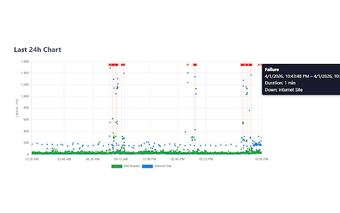
PingDoctor, developed by ubershmekel, is a Chrome extension designed to diagnose unstable internet connections. It continuously pings a local router and selected HTTP endpoints to reveal whether slowdowns begin on the Wi-Fi, at the router, or with the ISP. The tool displays recent ping history and real-time response behavior while following a no-data-collection policy. Remote workers, gamers, and home-office users gain quick, browser-based clarity without installing complex networking software.
PingDoctor isolates whether problems begin on the local network or further away
By comparing timing to the home gateway and to external web addresses, PingDoctor helps determine whether interruptions coincide with local gateway response failures or with unreachable remote endpoints. That comparative approach answers the common "where is the problem" question for home users, providing timestamps and a sequence of events that show whether an outage affects only the LAN or extends beyond to the wider internet.
PingDoctor keeps CPU and memory impact low inside the browser
The extension uses a browser-based monitoring model and the developer describes a minimal system footprint, so it avoids installing separate utilities. For users who prefer to keep troubleshooting within Chrome, this means constant checks without a separate background service. The lighter integration suits people who want quick diagnostics during calls or matches rather than a full network appliance running alongside their system.
PingDoctor follows a strict no-data-collection posture
The developer discloses a privacy policy that says no user data is collected or sold, and the extension advertises a privacy-focused design. For privacy-conscious home and office users, that means ping logs remain local to the browser and are not harvested for analytics. The explicit no-collection claim reduces one common concern about diagnostic tools that normally transmit telemetry to external services.
Chrome availability and active maintenance fit typical desktop workflows
Distributed as a Chrome extension, PingDoctor runs on desktop platforms where Chrome is used, and the project is actively maintained with recent updates. That distribution model makes it easy for users across multiple operating systems to add monitoring without platform-specific installers. The extension’s niche positioning favors simple, real-time visibility rather than replacing professional network management suites.
A practical, narrow diagnostic for everyday users who need quick clarity
PingDoctor suits remote workers and gamers who need immediate insight during meetings or matches, offering a focused alternative to heavier network tools. Expect a trade-off: it diagnoses where interruptions start but does not replace router firmware diagnostics or ISP support tools. Tip: enable the extension before critical sessions so any recorded interruptions line up with the activity you need to verify.